
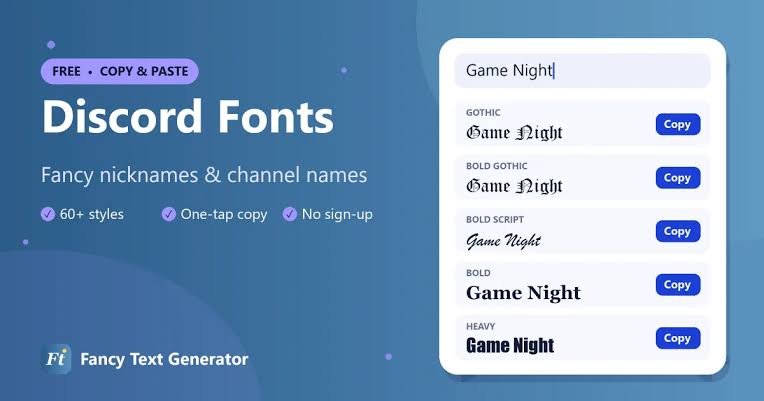
Discord fonts usually refer to one of two things: Discord’s built-in Markdown formatting and Unicode “fancy text” styles that you can copy and paste into names, messages, and server fields. Discord does not offer a traditional font-selection menu, but you can still make your text look bold, italic, monospaced, decorative, or stylized.support.discord+1
This guide explains how Discord fonts work, how to create them safely, where they work, and how to avoid accessibility and compatibility problems.
What Are Discord Fonts?
Discord uses its own interface font across desktop, web, and mobile apps. You cannot upload a custom font file or choose a new typeface for normal chat messages. Instead, people use the term “Discord fonts” for:
- Markdown formatting, such as bold, italic, underline, and code text.
- Unicode text styles, such as small caps, bold Unicode letters, script-style letters, and full-width characters.
- Decorative symbols, spacing, and emoji used to create a visual style.
Discord officially supports Markdown formatting in messages, including bold, italics, underline, strikethrough, code blocks, quotes, headings, and lists. Unicode styles are different: they are not real fonts but alternative characters that resemble different typefaces.support.discord+2
How to Format Text in Discord
Markdown is the safest and most readable way to change how a Discord message looks. It works in normal chat messages and is supported by Discord’s official formatting system.support.discord
| Style | Syntax | Example |
|---|---|---|
| Bold | **text** | text |
| Italic | *text* or _text_ | text |
| Bold italic | ***text*** | text* |
| Underline | __text__ | _text_ |
| Strikethrough | ~~text~~ | |
| Underlined bold | __**text**__ | text__ |
| Inline code | `text` | text |
| Block quote | > text | > text |
| Spoiler | ||text|| | Hidden text |
Discord also provides keyboard shortcuts for common formatting: Ctrl/Cmd + B for bold, Ctrl/Cmd + I for italics, Ctrl/Cmd + U for underline, and Ctrl/Cmd + Shift + M for inline code.discord+1
Bold Text
To make text bold, place two asterisks before and after it:
text**Welcome to the server**
This is useful for announcements, rules, event names, and important instructions.
Italic Text
Use one asterisk or underscore around your text:
text*Only for members*
Italics work well for tone, emphasis, titles, or side notes.
Underline and Strikethrough
For underline, use two underscores:
text__Read the rules first__
For strikethrough, use two tildes:
text~~old event~~
These styles help you show corrections, outdated information, or playful edits.
Code Fonts in Discord
If you want a monospaced “code font,” wrap text in backticks:
text`server-name`
For multiple lines, use three backticks:
text
Line one
Line two
text
Discord supports code blocks, and multiline code blocks can use syntax highlighting when you specify a programming language after the opening backticks.support.discord+1
How to Get Fancy Discord Fonts
Fancy Discord fonts are created with Unicode characters. A font generator converts normal letters into visually different characters, which you can then copy and paste into Discord. These are not installed fonts; they are special text characters.protexty
For example, a generator may turn “Discord Fonts” into styles such as:
- Small caps: ᴅɪꜱᴄᴏʀᴅ ꜰᴏɴᴛꜱ
- Bold Unicode: 𝗗𝗶𝘀𝗰𝗼𝗿𝗱 𝗙𝗼𝗻𝘁𝘀
- Script style: 𝒟𝒾𝓈𝒸ℴ𝓇𝒹 𝐹ℴ𝓃𝓉𝓈
- Full-width: Discord Fonts
Steps to Use a Discord Font Generator
- Open a trusted Discord font generator.
- Type the name, title, or short message you want to style.
- Choose a Unicode style.
- Copy the generated result.
- Paste it into your Discord display name, server nickname, channel name, role name, or message.
- Preview it on desktop and mobile before using it widely.
Small caps and bold sans-serif Unicode styles are often easier to read than highly decorative script fonts, especially in Discord’s sidebar.protexty
Where Discord Fonts Work
Unicode fonts can work in many Discord fields, but not everywhere. Discord’s unique @username system is more restrictive than display names and other profile fields.protexty
| Discord area | Fancy fonts usually work? | Best use |
|---|---|---|
| Display name | Yes | Personal branding |
| Server nickname | Yes | Community identity |
| Server name | Yes | Server branding |
| Channel name | Yes, with limitations | Themed channels |
| Role name | Yes | Staff, VIP, event roles |
| About Me | Yes | Short bio styling |
| Chat message | Yes | Short decorative lines |
| Unique @username | Limited | Usually plain characters only |
Discord display names and server nicknames are commonly limited to 32 characters, while server and channel names can be much longer. The exact behavior can vary by field, device, and Discord updates, so always test before publishing.protexty
Discord Fonts vs. Markdown
Use Markdown when you want clear, accessible formatting in messages. Use Unicode fonts when you want a decorative look for short labels and names.
| Feature | Markdown | Unicode fonts |
|---|---|---|
| Real font change | No | No |
| Works in messages | Yes | Yes |
| Works in display names | No | Often yes |
| Searchable as normal text | Usually yes | Often no |
| Screen-reader friendly | Better | Can be poor |
| Best for | Messages, guides, announcements | Names, roles, short titles |
Markdown remains searchable and readable because it formats ordinary text. Unicode-styled letters may be announced letter by letter by screen readers and may not match normal search terms.protexty
Best Discord Font Ideas
For Server Names
Keep server names short and recognizable. A stylish font can add personality, but members should still be able to read it quickly.
Examples:
- ᴛʜᴇ ɢᴀᴍɪɴɢ ʟᴏᴜɴɢᴇ
- 𝐌𝐢𝐝𝐧𝐢𝐠𝐡𝐭 𝐂𝐚𝐟𝐞
- ✦ Aesthetic Hub ✦
- ꜰᴜᴛᴜʀᴇ ᴢᴏɴᴇ
For Channel Names
Use fonts sparingly in channel names. If every channel uses a different style, navigation becomes confusing.
Examples:
- #𝗮𝗻𝗻𝗼𝘂𝗻𝗰𝗲𝗺𝗲𝗻𝘁𝘀
- #ᴍᴇᴍʙᴇʀ-ᴏɴʟʏ
- #gaming
- #ꜰᴀQ
For Roles
Role names are a good place for decorative fonts because they appear in the member list and can reinforce your server’s theme.
Examples:
- 𝐎𝐰𝐧𝐞𝐫
- 𝕄𝕠𝕕𝕖𝕣𝕒𝕥𝕠𝕣
- ᴠɪᴘ ᴍᴇᴍʙᴇʀ
- ✧ Event Team ✧
For Messages
For regular messages, prefer Markdown. It keeps conversations readable and ensures your text remains accessible.
Example:
text**Event Tonight:** *Movie Night* at 8 PM
Tips for Using Discord Fonts Safely
- Use fancy fonts for short text, not long paragraphs.
- Keep important information in normal text.
- Test fonts on both mobile and desktop.
- Avoid excessive symbols, which can look spammy.
- Do not use fonts to impersonate staff, Discord, or another user.
- Follow your server’s rules and Discord’s community standards.
- Avoid fonts in critical instructions, moderation warnings, or safety information.
Unicode characters can render differently depending on the viewer’s device, operating system, and installed fonts. Some characters may appear as boxes or fail to display correctly.protexty
Common Problems and Fixes
My fancy font does not work
Some Discord fields restrict certain characters. Try a simpler Unicode style, such as small caps, or paste the text into a different field such as your display name or role name.protexty
The font looks different to my friends
Unicode characters are sent as text, but the receiving device decides how to display them. A style may look perfect on your phone but appear differently on someone else’s device.protexty
My text is hard to read
Use decorative fonts only for titles or names. For messages, switch to Markdown formatting such as bold or italics.support.discord+1
Can I upload my own font?
No. Discord does not let regular users upload custom font files for chat or profile text. Your options are Markdown formatting and Unicode-based text styles.support.discord+1
SEO Meta Details
Meta title: Discord Fonts: How to Change, Copy & Format Text
Meta description: Learn how to use Discord fonts with Markdown, Unicode text, fancy fonts, code blocks, and copy-paste styles for names, roles, and messages.
URL slug: /discord-fonts
Frequently Asked Questions
What are Discord fonts?
Discord fonts are text styles created with Markdown formatting or Unicode characters. They change the appearance of text without actually installing a new font.support.discord+1
How do I make bold text in Discord?
Type two asterisks before and after your text: **bold text**. You can also highlight text and press Ctrl/Cmd + B on desktop or web.support.discord+1
How do I get fancy fonts on Discord?
Use a Discord font generator, choose a Unicode style, copy the result, and paste it into your display name, nickname, role name, or message.protexty
Do Discord fonts work on mobile?
Yes, but appearance can vary by device. Some Unicode characters may not display properly on every phone or operating system.protexty
Are fancy Discord fonts free?
Yes. Unicode fonts are plain text characters, so they do not require Discord Nitro or a paid subscription.protexty
What is the best font style for Discord?
Small caps and bold Unicode styles are usually the most readable. For messages, Markdown formatting is better because it remains clear, searchable, and accessible.support.discord+1
Discord fonts are best used as a creative accent, not a replacement for clear communication. Combine Markdown for messages with carefully chosen Unicode styles for names, roles, and server branding to create a polished Discord presence.